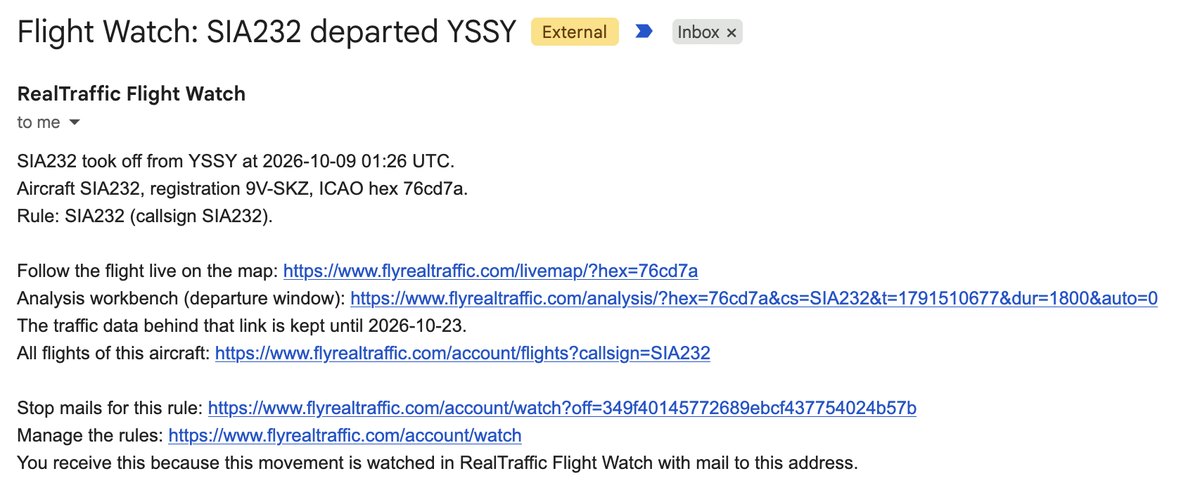
A Flight Watch mail, as it arrives: SQ232 just left Sydney for Singapore. One click follows it live, one opens the departure in the workbench.
Dear fellow aviator,
Four weeks ago I showed you the rebuilt livemap on the RealTraffic website. This time it is a single thing, and it is the one I have been itching to tell you about: RealTraffic now watches the sky for you. Tell it which aircraft, which flight or which piece of airspace you care about, and it emails you when something happens there - and behind that sits a searchable index of every flight in the system.
To be clear before I go on: like the livemap, everything below lives on the website, in your account at flyrealtraffic.com and in your mailbox. It is not a feature of the RealTraffic app - the app is unchanged and keeps feeding your simulator exactly as before.
Here is how it works, with my own rules as the examples.
Every flight, searchable
RealTraffic now keeps an index of every flight it sees: every takeoff, every landing, for every aircraft in the feed, worldwide, for the last fourteen days. The Flights page in your account on the website searches it by registration, callsign or flight number, ICAO hex, aircraft type, operator, departure or arrival airport, or any airport at either end - with a time window in your local time. Flights in the air right now come first, with their current position; every row carries the runways used, the flight time and distance, and links that open the departure or the arrival in the Flight Analysis Workbench.
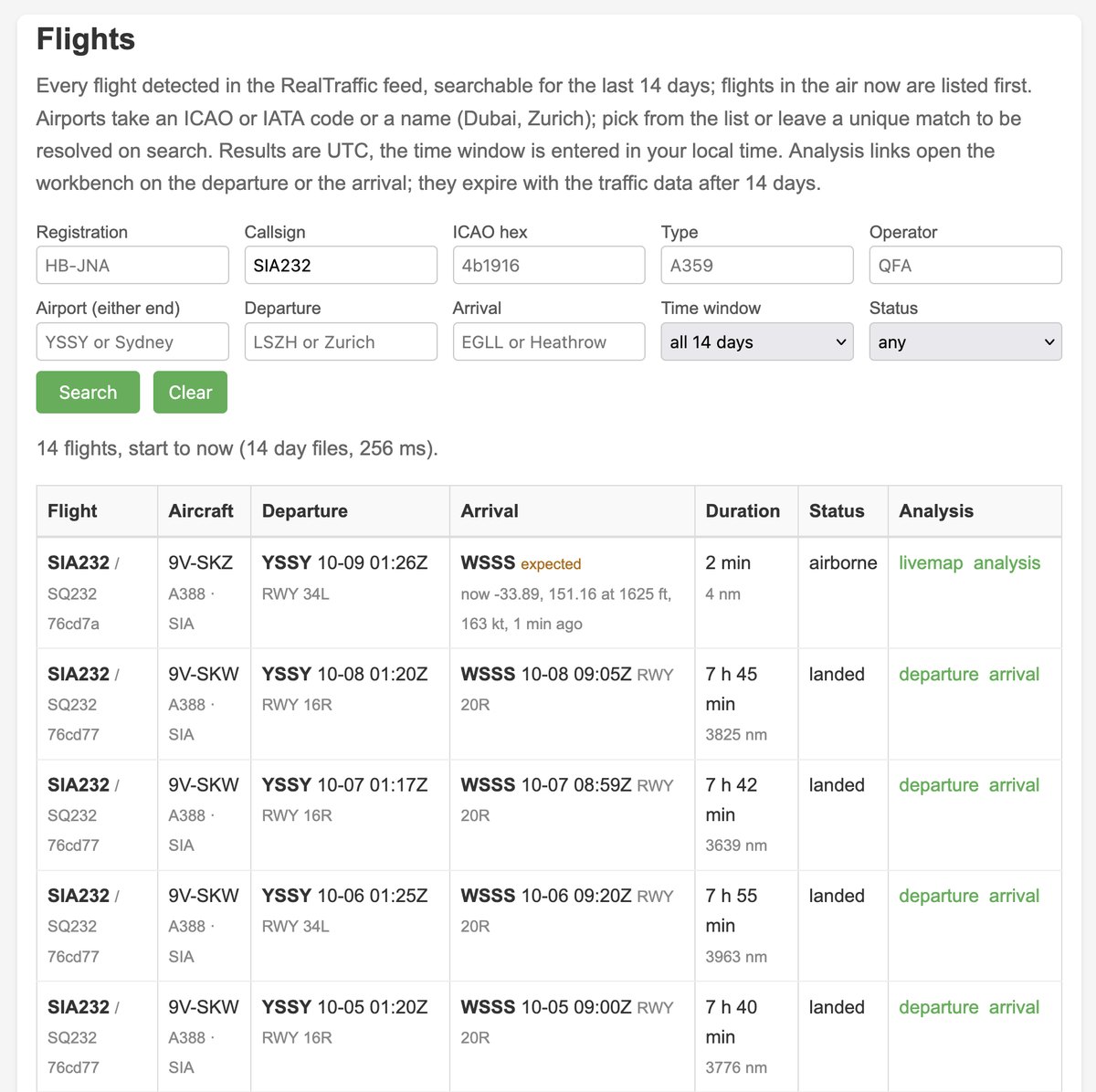
Fourteen days of SQ232: which airframe flew it, which runway it used, how long it took, and an analysis link for every departure and arrival. The top row is in the air right now.
The same index feeds the livemap on the website: follow an aircraft and the panel lists its previous flights; click an airport and the popup shows what actually departed and arrived in the last six hours, next to the published schedule.
Flight Watch: the sky watches itself for you
And then the part I have wanted RealTraffic to have for years. Flight Watch is a set of rules that run against that stream of flights, around the clock, and email you when something you care about happens.
Watch an aircraft or a flight. Give it a registration, a flight number or a hex code and you get a mail the moment it takes off and the moment it lands - with a link to follow it live, a link that opens the departure or the arrival in the workbench, and a link to all its flights. Your own aircraft. A flight school's fleet. The flight someone you love is on tonight. The quickest way to set one up is the livemap on the website: open any aircraft and click Watch this aircraft.
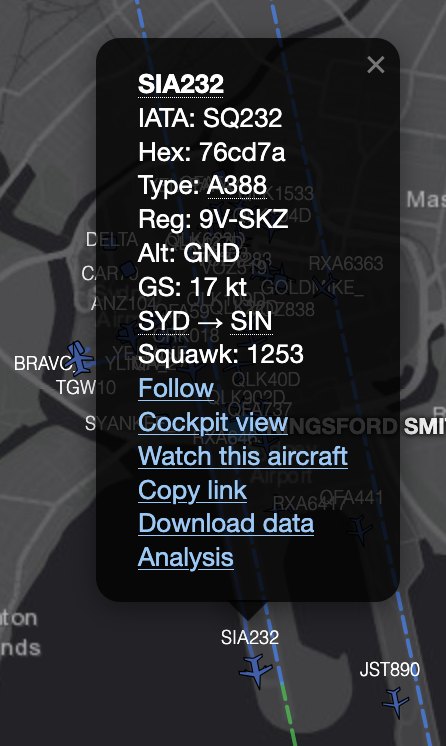
Every aircraft popup on the website livemap now has a Watch this aircraft link.
Mail goes to whoever should get it. For each rule you can pick the recipient, and recipients do not need a RealTraffic account: add an address, the person confirms it once, and every mail they get carries links to the flight, as well as a link that lets them unsubscribe from the alerts whenever they want. So the instructor gets the fleet, the parents get one aircraft, and you get the lot.
Watch an airspace. An area rule records every aircraft that enters a volume. Pick a published one - a control zone, a TMA, a restricted or danger area - or draw your own polygon, rectangle or circle, and give it a floor and a ceiling as ground, feet above sea level or a flight level. The altitude test is done properly: limits in feet MSL are checked against the aircraft's QNH-corrected altitude using the pressure from the GFS model at that place and time, not the raw transponder value.
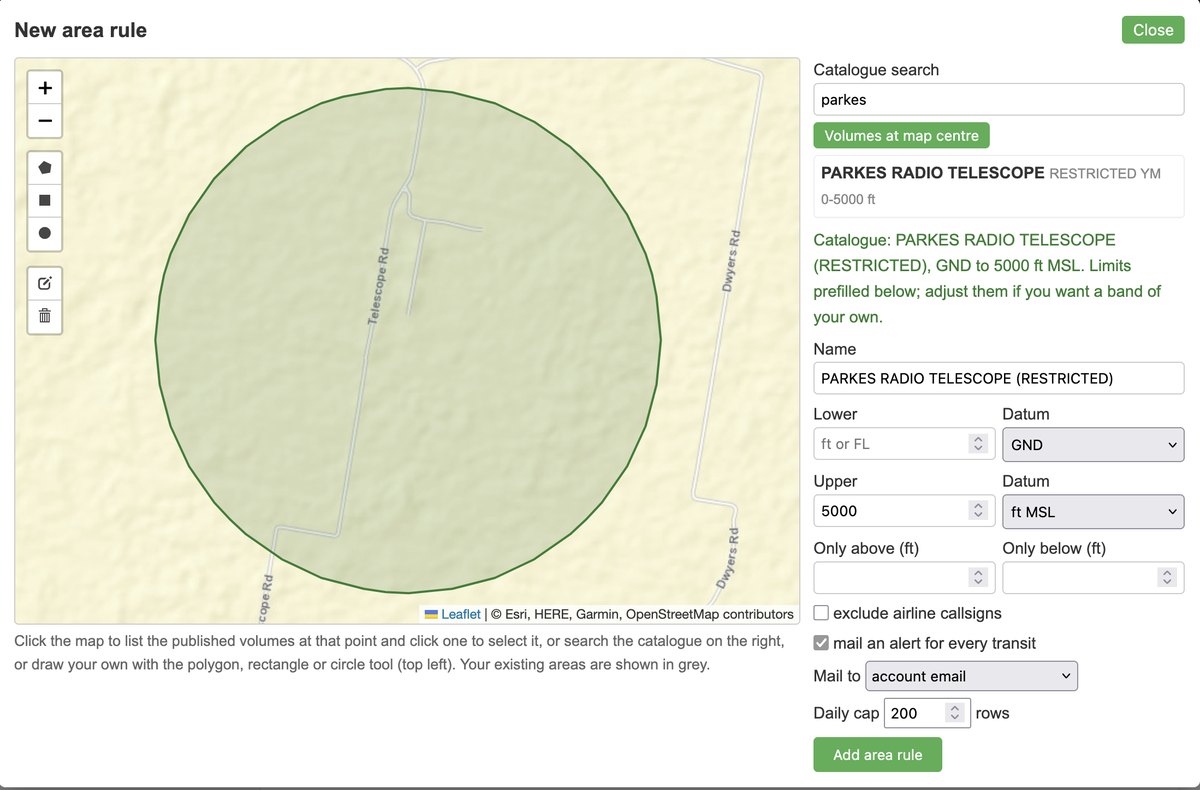
Picking a published volume: the restricted area around the Parkes radio telescope, limits prefilled from the catalogue.
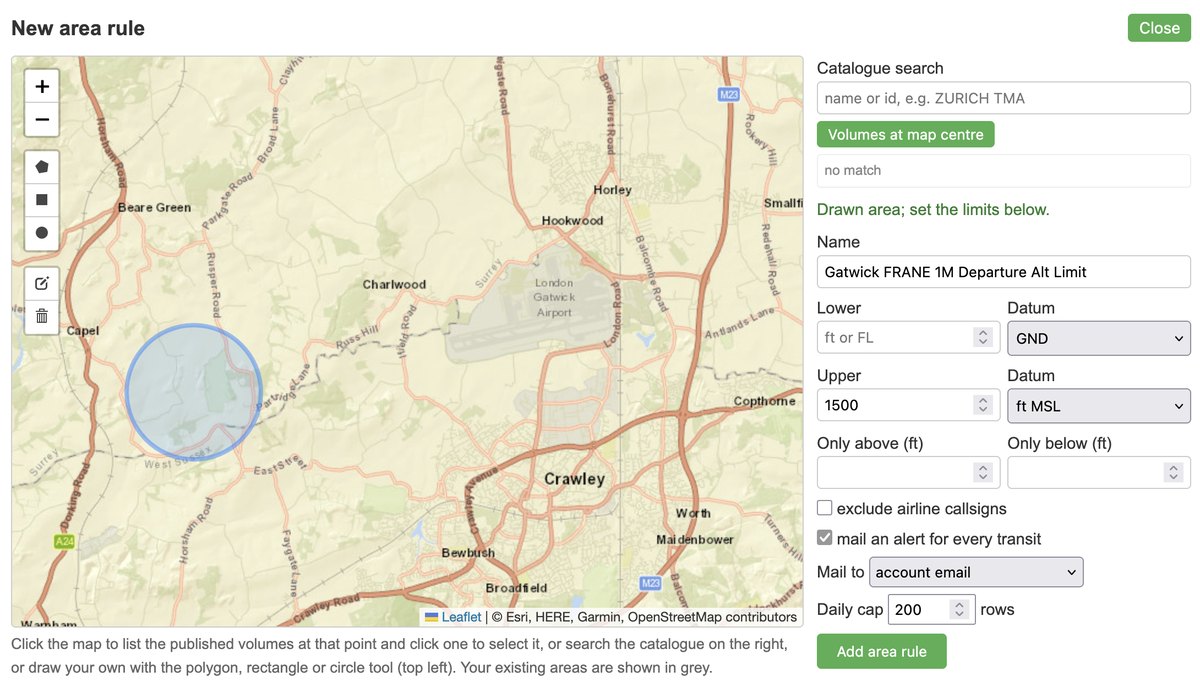
Drawing your own: a circle under the FRANE 1M departure out of Gatwick, ground to 1,500 ft. Anything still below 1,500 ft over that spot gets recorded.
Every transit is listed with the time inside, the altitude band the aircraft was seen at and the QNH used - and flagged marginal when it only just made it in. A transit link opens the workbench bracketed on exactly those minutes. Alerts are per transit, or you can switch the mail off and just let the rule record.
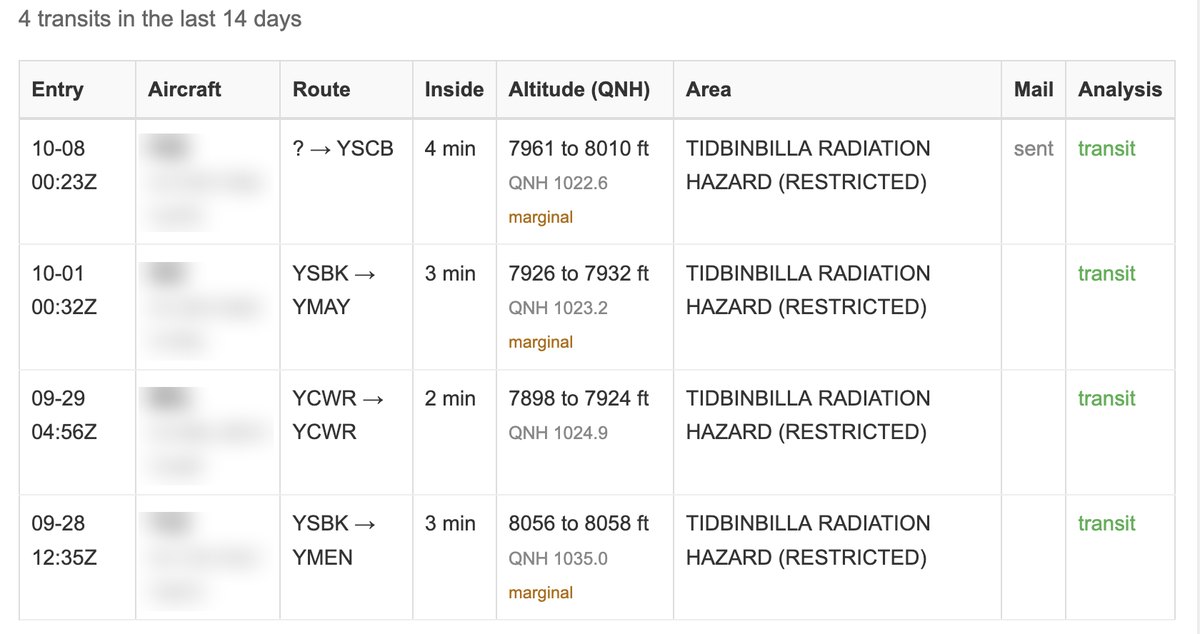
Four transits of the Tidbinbilla radio-quiet zone in two weeks, each with the altitude band it was seen at, the QNH used, and a link into the workbench. Aircraft identities blurred here.
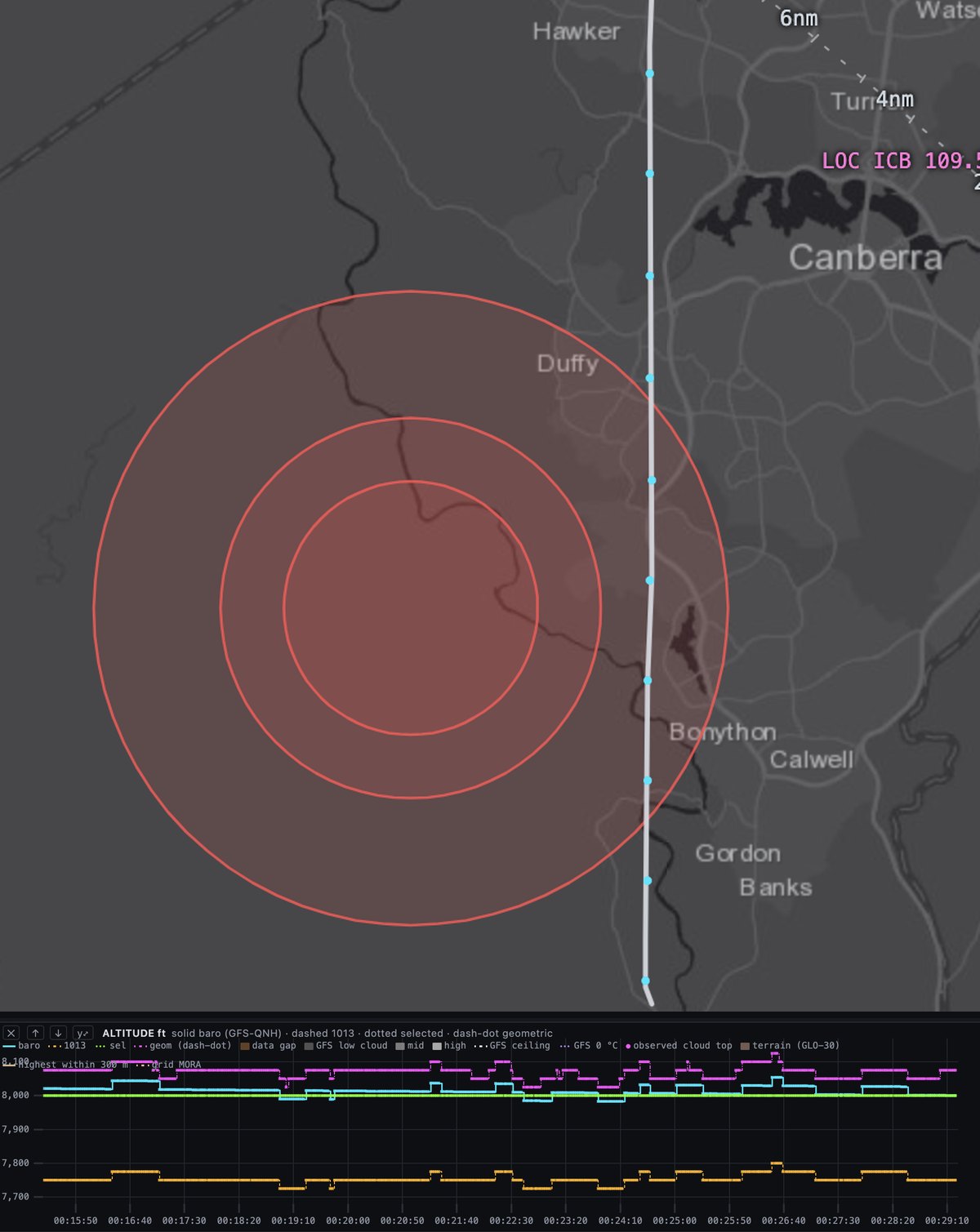
The transit opened in the workbench: the track clips the eastern edge of the outer ring, and the altitude trace sits within a few tens of feet of the 8,000 ft ceiling the whole way - which is why the rule flagged it as marginal.
One thing to know: the rule fires whenever an aircraft is inside the volume. It does not know whether a restricted area was active at the time - published hours and NOTAM activation are not available to it - so a transit is a fact about the aircraft, not a finding about the pilot.
Twenty aircraft rules and ten area rules per account. Rules fire whenever they fire and every movement is recorded; only the mail is capped, at thirty a day per account, so a busy zone fills the table rather than your inbox. Flight Watch and the Flights search are Professional Edition features of the website; the pages are visible to everyone with an account, so you can see what they do before deciding.
Getting at it
If you are on Professional, both pages are in your account menu on the website now (not in the app) - Flights and Flight Watch - and the Watch link is in every popup on the website livemap. Go and put your own registration in; the first mail is a small thrill.
If you are on Standard, two ways up. You can upgrade from your dashboard and pay only the difference for the time you have left. Or you can feed: run an ADS-B receiver, send its data to RealTraffic, and your paid Standard subscription is upgraded to Professional at no cost for as long as you keep feeding - Flight Watch, the workbench, the cockpit view, radar, satellite, all of it. Community feeders give me the best low-altitude and small-airport coverage I have anywhere, which is exactly the coverage that makes a takeoff or a landing detectable in the first place. The Feeder page in your account has your feeder ID and the one line of configuration a Raspberry Pi setup needs; if you have never built one, hit reply and I will help you pick the hardware. And if you already feed: thank you. Every one of those transits above was detected by someone's antenna.
Thank you for subscribing. RealTraffic has no investors and no ads; your subscription is what pays for the data, the servers and the months I get to spend building things like this. If something feels wrong, hit reply - I read every one.
Next time
In two weeks: the weather stack - the forecast overlays, the live satellite and radar, the SIGWX charts and SIGMETs - taken apart properly, now that the big announcement is out of the way.
If you have questions, support@flyrealtraffic.com reaches me, or simply hit reply. It is me at the other end - no bots, no support department.
These newsletters are also how important service news reaches you - changes affecting your setup, your subscription or the API - and there is no other channel for that. I send them once, at most twice a month. Adding news@flyrealtraffic.com to your contacts usually keeps them out of the spam folder.
And if you would rather not hear from me at all, please do not mark this as spam - just unsubscribe and you will never hear from RealTraffic again, promise. It does mean you will miss service announcements too, so only do it if you really mean to.
Happy landings!
Balthasar