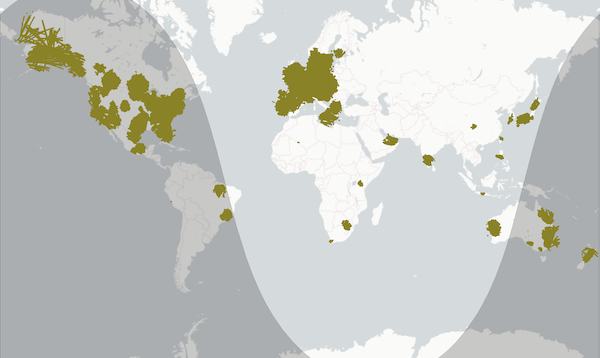
Current ADS-B coverage of RealTraffic's own network - if you see traffic anywhere else in RT, it's from purchased data your subscription helps fund!
Dear fellow aviator,
A quick note first: this newsletter comes to you from RealTraffic's own mail system now instead of Mailchimp. If you hit reply, it's me reading it, and you'll get an answer from me personally.
Feed Your ADS-B Data, Fly for Free
You created a RealTraffic account at some point but never got yourself a license - so this offer is for you: if you run an ADS-B receiver and feed your data to RealTraffic, you get a free Standard license, active for as long as your feed produces good data. No trial period, no credit card, no catches.
That's the full Standard experience: real live air traffic and real weather in your simulator, the livemap with active runway display, and the interactive global weather map - all for pointing an antenna at the sky.
One thing I want to be frank about: the feeder license is a genuine thank-you, not a trick. But RealTraffic is a one-person operation with real costs - the worldwide traffic data I buy to fill in where no feeder lives, the servers, the weather pipeline - and all of that is paid for by people who subscribe. So if you end up flying with RealTraffic regularly, and it's something you can comfortably afford, a subscription is the thing that keeps this whole service airborne. No pressure either way; I'd rather you feed for free than not fly with real traffic at all.
Why am I doing this? Because community feeders are simply the best data source I have. They consistently give the best coverage at low altitudes and around smaller airports - exactly where you want traffic to show up when you're flying the sim. Every new antenna fills a gap on the map, and everyone's traffic gets better, including yours.
Setting Up Takes About Five Minutes
- Log in to your RealTraffic account at flyrealtraffic.com/account
- Open the Feeder page - it shows your personal feeder ID and the exact one-line configuration for readsb/tar1090 based setups, which covers most Raspberry Pi ADS-B images. That page also has links that will help you build a receiver if you don't already have one.
- Add the line shown on the feeder page to your receiver, and you're done. The license activates automatically once your data starts flowing, and stays active while you feed.
Never run a receiver before? A Raspberry Pi, a cheap SDR dongle and a small antenna near a window is genuinely all it takes to get started - hit reply if you'd like hardware advice, I'm happy to point you in the right direction.
If you have any questions, just email support@flyrealtraffic.com and you'll be sure to get a response quickly - or simply hit reply on this message.
One more thing worth mentioning: these newsletters aren't just feature announcements. Important service news - changes that may affect your setup, your license, or the API - also goes out through this channel, and there's no other way for me to reach you. And don't worry about your inbox - I send these once, at most twice a month. So it's worth making sure they actually reach you; adding news@flyrealtraffic.com to your contacts usually does the trick.
Lastly, I really don't want to intrude, so if you no longer wish to receive any email updates from me, please don't mark this as spam, but simply unsubscribe by clicking here: Unsubscribe and you'll never hear from RealTraffic again, promise! That also means you won't get any important service announcements, so please don't unsubscribe unless you really mean to. If you want to delete your account (and never hear from RealTraffic again), log into your dashboard, and hit the delete button.
Happy landings!
Balthasar